A help desk should only reset a password or an MFA method after a check that a caller can't talk their way through: a cryptographic credential tied to the employee record, or a fresh document and liveness check. Security questions, caller ID and "tell me your employee number" no longer count. This is for IT service desk leads and identity teams deciding how to verify callers, especially those running Microsoft Entra ID. The hard part is not the normal call. It is the caller who has lost the very phone your verification depends on.
Key Takeaways
Attackers call the help desk on purpose. The CISA and FBI advisory on Scattered Spider describes attackers who phone IT staff to reset passwords and move MFA to a device they control.
Knowledge questions are out.NIST SP 800-63A-4 says knowledge-based verification shall not be used to verify identity.
Push to a registered phone works until the phone is gone. Every method that relies on an enrolled device fails in the recovery case, which is when people actually call.
Pair a reusable credential with a fallback. A verified credential handles routine calls in seconds; a fresh identity check covers lost devices.
Method
Stops a cloned voice?
Works if the phone is lost?
Agent effort
Security questions
No
Yes
Low
Caller ID or call-back
No (SIM swap)
Sometimes
Low
Push or code to enrolled device
Yes
No
Low
Manager vouches
Partly
Yes
High
Video call, ID held to camera
Weak
Yes
High
Fresh document and liveness check
Yes
Yes, on any phone
Medium
Reusable verified credential
Yes
No, until reissued
Low
Why Do Attackers Target the Help Desk?
Because a help desk is built to say yes. Its job is to restore access fast, and a reset hands the caller a working account without breaking any encryption. The CISA and FBI advisory AA23-320A, revised in July 2025, records the pattern: attackers "use voice communications to convince IT help desk personnel to reset passwords and/or MFA tokens." They first call to learn the reset procedure, then come back with the answers.
The advisory also lists SIM swapping, where a carrier moves the victim's number to the attacker's SIM, and MFA fatigue, where repeated push prompts wear the user down until they accept one. Both defeat methods that look strong on paper. After the 2025 attacks on UK retailers, the NCSC told organisations to review help desk password reset processes, including how the help desk authenticates staff before resetting credentials, especially for privileged accounts.
Voice is no longer proof of anything. In May 2025 the FBI warned that criminals were using AI-generated voice messages to impersonate senior US officials. A help desk agent who "recognises" a manager's voice is running a check that a cheap tool can now pass.
What Do NIST, CISA and the NCSC Recommend?
They agree on three things, even though none of them publishes a step-by-step help desk script.
First, no knowledge-based checks. NIST SP 800-63A-4, section 2.5.1 states that knowledge-based verification shall not be used for identity verification, and SP 800-63B-4 bars prompting users for knowledge-based authentication when they set passwords. Dates of birth, addresses and "last four digits" are exactly what attackers collect first.
Second, recovery is its own process, with its own controls. SP 800-63B-4, section 4.2 lists four recovery methods: saved recovery codes, issued recovery codes, recovery contacts, and repeating part of the identity proofing. It allows an agent-assisted method too, but expects the same rigour. It also requires a notification to the user after every recovery, so a hijacked reset doesn't stay silent.
Third, phishing-resistant authentication everywhere it can go. CISA's mitigation list starts with FIDO or PKI-based MFA, which is "not susceptible to push bombing or SIM swap attacks." That protects the login. It doesn't help when the user has lost the key, which brings the problem back to the help desk.
Read together, the guidance points to one design: verify the person with something an attacker cannot recite, then issue a short-lived way back in, then tell the account owner it happened.
How Does Help Desk Verification Work With Microsoft Entra Verified ID?
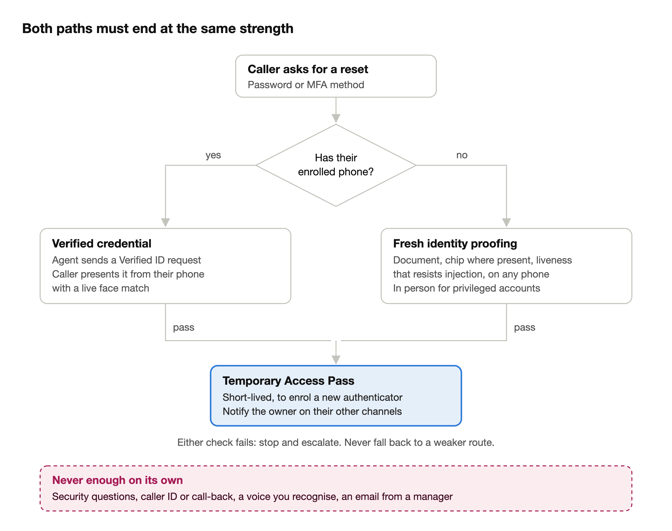
The agent sends a verification request, the caller presents a verified credential from their phone, and the agent sees a pass or fail before doing anything. Microsoft documents this as the verified help desk pattern, and it states the reason plainly: personal data and knowledge-based authentication "are no match for today's sophisticated attackers."
In Microsoft's version, the caller presents a VerifiedEmployee credential with Face Check, which compares a live selfie with the photo in the credential. The verifier receives only a confidence score, not the selfie. After a pass, the agent can issue a Temporary Access Pass, a time-limited code the user signs in with to register a new authenticator. Since May 2026 Microsoft also offers Entra ID Account Recovery, which replaces the agent with automated identity proofing and ends with the same Temporary Access Pass.
The credential is only as good as the identity check behind it. That is where identity verification partners come in: they check a government ID and the person's face, then issue a credential that says so. In 2026 an IAM team at a Swiss multinational asked us for exactly this: gate every new hire through Entra Verified ID before any access is provisioned, at about 7,800 hires a year. The same logic applies to a reset. If the credential was issued after a weak check, the help desk inherits the weakness.
Both paths end at the same strength: a short-lived Temporary Access Pass and a notification to the account owner. If either check fails, the agent stops and escalates.
What If the Caller Has Lost Their Phone?
Then every phone-based method fails, including a verified credential, and the help desk needs a fresh identity check. This is the case most tools skip, and it is the one attackers claim: "I dropped my phone, I'm at the airport, I need access now."
A safe fallback has three parts. The caller proves who they are again, from scratch, with a document and a liveness check on any smartphone, or in person if the account is privileged. SP 800-63B-4, section 4.2.1.4 names this as a valid recovery route: repeat a portion of the identity proofing. The check must resist injected video, not just photos held to a camera. ENISA's 2024 good-practice report found that "digital injection attacks have a greater success rate than presentation attacks." We cover what that means for liveness in injection attacks vs liveness checks. Finally, the result goes to the account owner's other channels as a notification, and the new access is short-lived until a new authenticator is enrolled.
What the fallback shouldn't be is a softer version of the normal path. If the lost-phone route accepts a manager's email or a video call, attackers will always lose their phone.
What Should You Look For in a Help Desk Verification Tool?
Four questions separate the tools that hold up from those that move the problem around.
What proves the person at the moment of the call? A live face match against the credential, or only the phone's own unlock? A device unlock proves someone has the phone, not who they are.
How strong was the original identity check? Ask which standard the proofing meets and who audited it. A credential issued after a selfie-only check is weaker than one issued after a document, chip and face check reviewed by trained staff.
What happens when the device is gone? If the answer is "call the help desk", ask what the help desk then does.
How does it plug into your directory? In Entra, check whether the vendor is a Security Store partner, which works inside Entra ID Account Recovery out of the box, or an API-based partner, which needs a direct contract and integration work. Microsoft lists both in its IDV partner gallery.
Where ZealiD Fits, and Where It Doesn't
ZealiD is a Qualified Trust Service Provider on the EU Trusted List, and its identity proofing follows ETSI TS 119 461 at the Extended level of identity proofing, as set out in our Trust Service Practice Statement. Registration officers are trained to detect presentation and injection attacks, and an automated face match decides alone only at the highest of seven confidence levels. When a user completes onboarding, the ZealiD app receives a verified credential, valid for two years, that an Entra tenant can request by QR code.
The limits are worth knowing before you choose. ZealiD is listed by Microsoft as a Verified ID API-based integration partner, not a Security Store partner, so it does not appear inside Entra ID Account Recovery; you integrate through the Verified ID APIs. At presentation, the ZealiD app confirms the holder with the phone's biometrics rather than Microsoft's Face Check, which works only in Microsoft Authenticator. And a user who loses their phone must register again before the credential can be used.
FAQ
What is the best way for a help desk to verify a caller's identity?
Use a check the caller can't recite: a verified credential presented from their phone with a live face match, or a fresh document and liveness check. Then issue short-lived access and notify the account owner. Avoid security questions and caller ID.
Why shouldn't help desks use security questions?
The answers are often public or easy to collect, and attackers gather them before calling. NIST SP 800-63A-4 says knowledge-based verification shall not be used for identity verification.
Is caller ID or a call-back enough?
No. Caller ID can be spoofed, and SIM swapping lets an attacker receive calls and texts to the victim's number. CISA lists SIM swapping among Scattered Spider's techniques.
How does Microsoft Entra Verified ID work for help desks?
The agent sends a verification request, the caller presents a verified credential, and Entra returns a result. With Face Check, a live selfie is compared with the credential photo. After a pass, the agent can issue a Temporary Access Pass.
What should a help desk do if the caller lost their phone?
Repeat the identity proofing from scratch with a document and liveness check, or in person for privileged accounts. Never accept a weaker route for lost devices, because attackers will claim one.
Which tools offer identity verification for remote help desks?
Microsoft lists its Entra Verified ID identity verification partners in a public IDV partner gallery, split into Security Store and API-based partners. Compare them on the four questions above: proof at call time, original check strength, lost-device handling and directory fit.
References
Cybersecurity and Infrastructure Security Agency and FBI. "Scattered Spider (AA23-320A)." Published 16 November 2023, revised 29 July 2025.
Tomas Zuoza is CEO of ZealiD, a Qualified Trust Service Provider listed on the EU Trusted List, supervised by the Swedish Post and Telecom Agency (PTS) under the eIDAS regulation. He has spent over nine years at ZealiD across business development, operations, and product, leading the company through its 2020 milestone as the first EU trust service provider to issue qualified electronic signatures via fully automated, non-video registration. Before becoming CEO in 2025, he served as Chief Product Officer and COO, building ZealiD's signing infrastructure and expanding its certification portfolio to include qualified time stamps. His expertise spans GDPR, information security, and NIS2 compliance, and he now leads the development of Trust Circle, a verified workspace for professional services firms and their clients.